![digital-skillstruck-brandmark-white-blue@192x.png]](https://support.skillstruck.com/hs-fs/hubfs/digital-skillstruck-brandmark-white-blue@192x.png?height=40&name=digital-skillstruck-brandmark-white-blue@192x.png)
Last updated - September 22, 2026
Enable this setting to require students to finish their current lesson before unlocking the next one.
For information on how to make edits to your section, please follow this article. For information on creating a section, please follow this article.
-
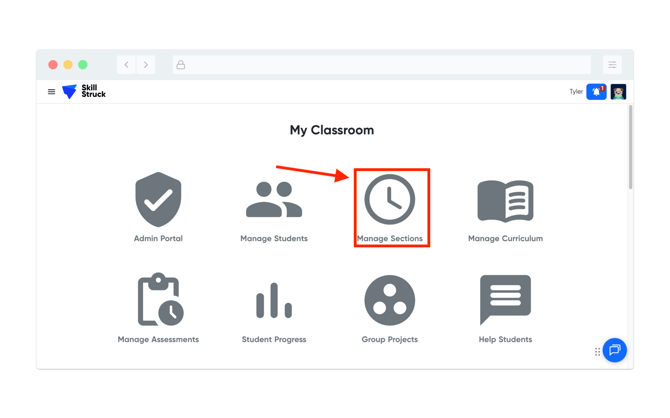
From your Educator Portal, click on Manage Sections.
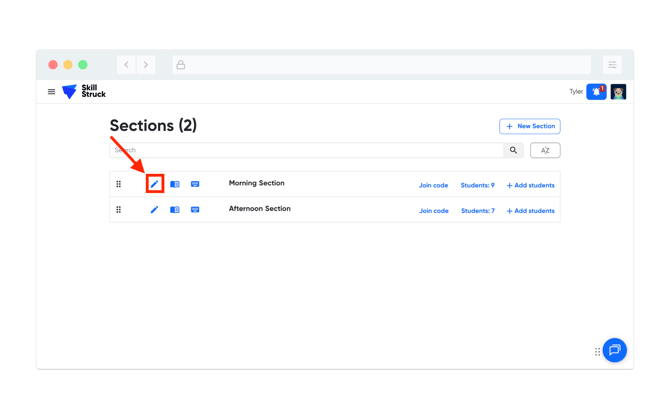
- Click the pencil icon next to the section you want to apply the setting.
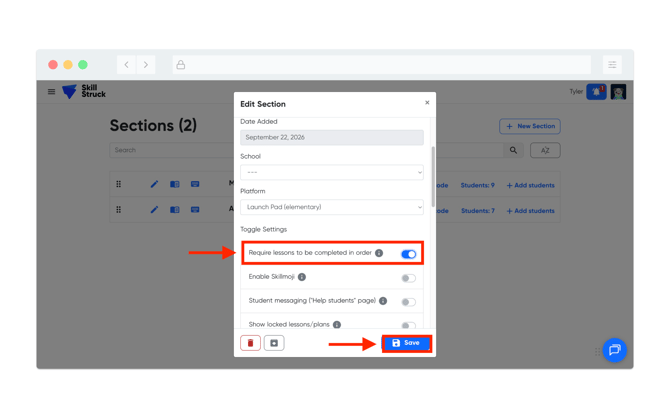
- From the Edit Section page, scroll down to the "Require lessons to be completed in order" and toggle on (if highlighted blue, setting is enabled). Then click Save to apply the change.