![digital-skillstruck-brandmark-white-blue@192x.png]](https://support.skillstruck.com/hs-fs/hubfs/digital-skillstruck-brandmark-white-blue@192x.png?height=40&name=digital-skillstruck-brandmark-white-blue@192x.png)
Last updated - October 27, 2026
Before students can access the AI in CTE curriculum, the "Chat for Schools" access toggle must be enabled at the section level. Learn more in this article.
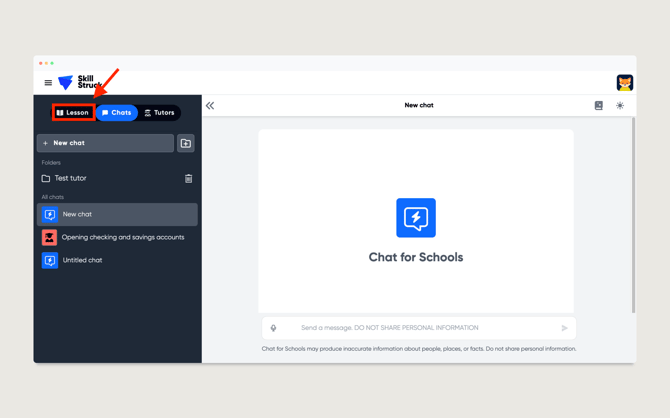
- Once the student has logged in to Chat for Schools, they will need to click on the Lessons tab.
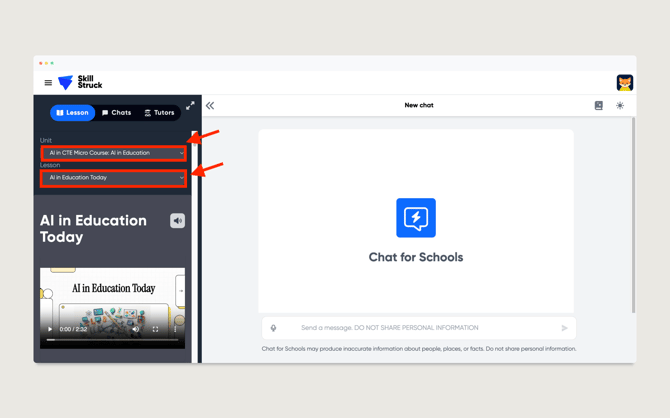
- From the Lesson tab, select the appropriate course and lesson from the respective drop-downs.
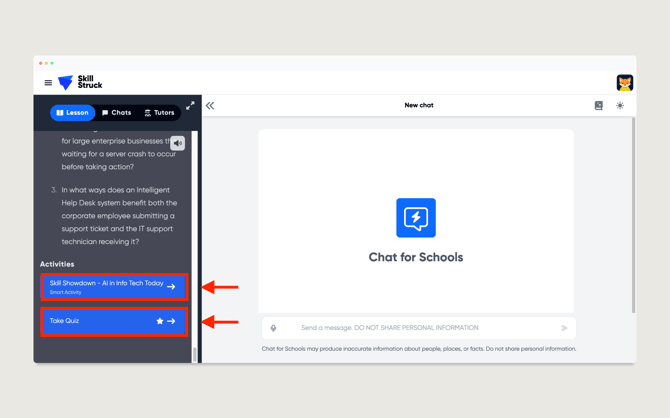
- Each lesson includes a reading passage and a quiz, along with an optional Smart Activity in select lessons.
-
Once a student completes a lesson, a checkmark will appear next to it in the Lesson drop-down menu.
