![digital-skillstruck-brandmark-white-blue@192x.png]](https://support.skillstruck.com/hs-fs/hubfs/digital-skillstruck-brandmark-white-blue@192x.png?height=40&name=digital-skillstruck-brandmark-white-blue@192x.png)
Last updated - September 8, 2026
Before you can view a previous section's progress, the section needs to be reactivated. Please follow this article to restore it from your archived sections (under section How to Restore an Archived Section).
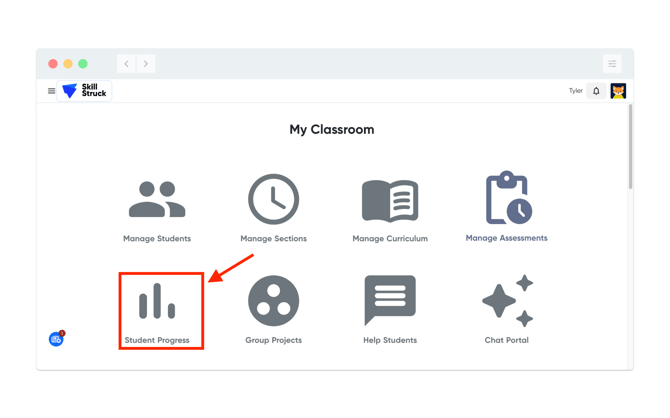
1. Once the section has been restored navigate to Student Progress from your Educator Portal.
2. From Student Progress, select the section and click on the Locked Courses Hidden icon.
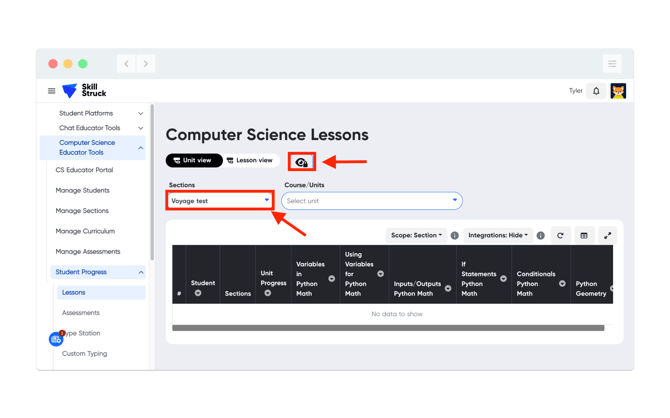
3. The Locked Courses icon should now appear as unlocked. From the Course/Units drop down, navigate to the course that you are looking for.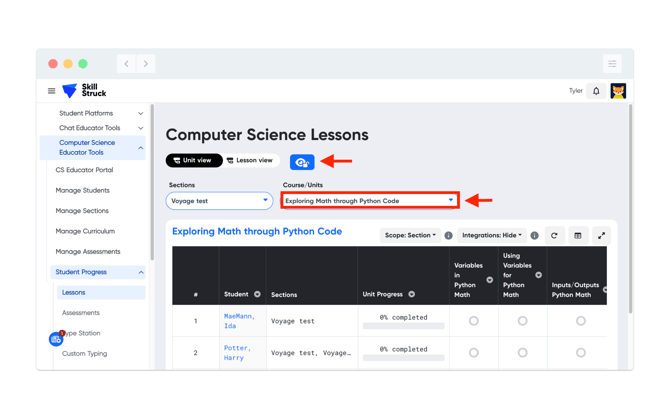
4. Progress should now be viewable for the previously archived section.