![digital-skillstruck-brandmark-white-blue@192x.png]](https://support.skillstruck.com/hs-fs/hubfs/digital-skillstruck-brandmark-white-blue@192x.png?height=40&name=digital-skillstruck-brandmark-white-blue@192x.png)
Last updated - July 10, 2026
Yes, you can set incomplete assignments to zero in Canvas. First navigate to Gradebook, go to the top column, click the three dots at the top column, select "Apply Score to Ungraded". Place a 0 in the "Grade for ungraded artifacts" section, under the "Apply to" section select "Only ungraded artifacts that are past due", click "Apply Score".
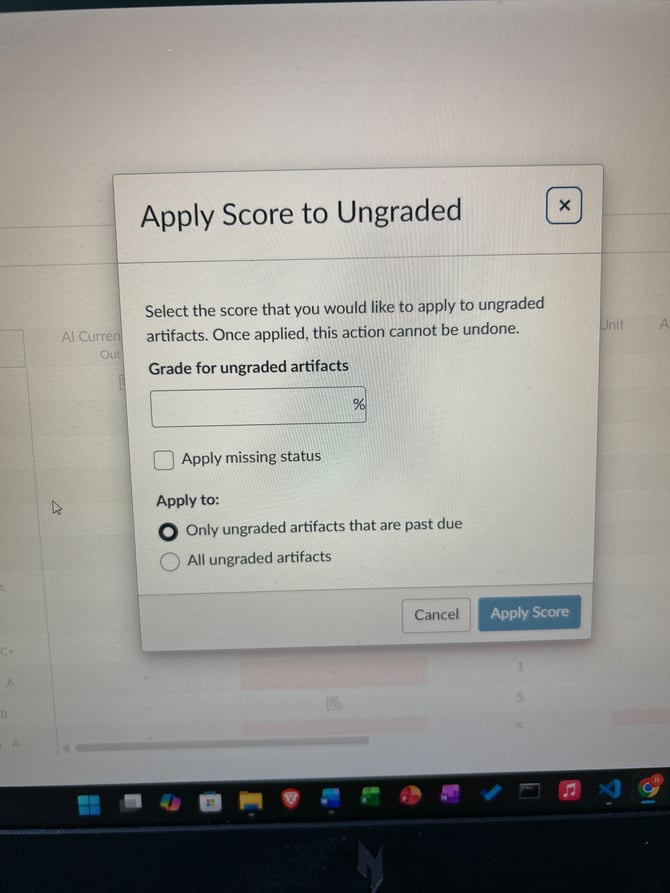
For more information on this process, please follow this article from Canvas.